Recently we come up with a situation during a migration
to WPF where we needed to create a control that used an
item template and we needed to bind the item template
control to a control.
WPF in general is a framework that has great support for MVVM.
The DataBinding is great, but what about binding events.
Well... I don't know why WPF does not have an out-of-the box support
for event binding.
The MVVM way to do this binding is to use Commanding (see ...), but
is not that natural.
In this post I will describe how we worked out a solution for binding
an event, in particular Click Event for controls defined in an ItemTemplate.
So, all this story started when we had an itemtemplate like:
<HierarchicalDataTemplate x:Key="
  CheckBoxTreeViewItemTemplate"
  ItemsSource="{Binding Items, Mode=OneWay}" >
 <StackPanel Orientation="Horizontal">
  <Image Margin="2,0" Source="{Binding ImageSource, Mode=TwoWay}" />
     <CheckBox Focusable="False" IsChecked="{Binding IsChecked}" VerticalAlignment="Center"/>
     <ContentPresenter Content="{Binding Text, Mode=TwoWay}" Margin="2,0" />
 </StackPanel>
</HierarchicalDataTemplate>
The idea was to create a collection of CheckBoxTreeViewItem(s) and bind that
collection to a control like a TreeView.
We also had a restriction. We did not wanted to subclass the TreeView
or any other control.
Binding an Event to an ItemTemplate
Google took me to this post:
http://stackoverflow.com/questions/2974981/wpf-datatemplate-event-binding-to-object-function
This gave me a great guide on how to bind the event item.
The starting code for our item was:
using System;
using System.Collections.Generic;
using System.ComponentModel;
using System.Linq;
using System.Text;
using System.Windows.Controls;

    public class CheckedTreeViewItem : ItemsControl, INotifyPropertyChanged
    {
        bool? _isChecked = false;
        string _imageSource = String.Empty;
        int _imageIndex = -1;

        public TreeView TreeView
        {
            get
            {
                if (this.Parent != null && this.Parent is TreeView)
                {
                    return this.Parent as TreeView;
                }
                else if (this.Parent != null && this.Parent is CheckedTreeViewItem)
                {
                    return ((CheckedTreeViewItem)this.Parent).TreeView;
                }
                else
                {
                    return null;
                }
            }
        }

        public string ImageSource
        {
            get { return _imageSource; }
            private set { _imageSource = value;}
        }

        public bool? IsChecked
        {
            get { return _isChecked; }
            set { this.SetIsChecked(value, true, true); }
        }

        public bool IsExpanded
        {
            get;
            set;
        }

        public string Text { get; set; }

        public string Key { get; set; }

        public int ImageIndex
        {
            get
            {
                return _imageIndex;
            }
            set
            {
                _imageIndex = value;
                if (_imageIndex >= 0)
                {
                    var imageList = UpgradeHelpers.VB6.WPF.ImageList.ImageListAttachedProperties.GetImageList(TreeView);
                    var extractedSource = ((Image)imageList.Items[_imageIndex]).Source;
     _imageSource = extractedSource.ToString();
                }
                else
                {
                    _imageSource = String.Empty;
                }

            }
        }

        public bool IsInitiallySelected { get; private set; }

        public event PropertyChangedEventHandler PropertyChanged;

        void SetIsChecked(bool? value, bool updateChildren, bool updateParent)
        {
            if (value == _isChecked)
                return;

            _isChecked = value;

            if (updateChildren && _isChecked.HasValue)
            {
                foreach (CheckedTreeViewItem node in this.Items)
                {
                    node.SetIsChecked(_isChecked, true, false);
                }
            }

            if (updateParent && this.Parent != null && this.Parent is CheckedTreeViewItem)
                ((CheckedTreeViewItem)this.Parent).VerifyCheckState();

            this.OnPropertyChanged("IsChecked");
        }

        protected void OnPropertyChanged(string property)
        {
            if (PropertyChanged != null)
            {
                PropertyChanged(this, new PropertyChangedEventArgs(property));
            }
        }

        void VerifyCheckState()
        {
            bool? state = null;
            for (int i = 0; i < this.Items.Count; ++i)
            {
                bool? current = ((CheckedTreeViewItem)this.Items[i]).IsChecked;
                if (i == 0)
                {
                    state = current;
                }
                else if (state != current)
                {
                    state = null;
                    break;
                }
            }
            this.SetIsChecked(state, false, true);
        }

    }
I needed a property exposing a command, so we could bind a controls
Command to a ClickEventHandler. The event should be defined as an
attached event. Why? Because we wanted users of this item to be able
to define for example in the TreeView an event handler that will be
then assigned to all my checkboxes. So if a users clicks one of the
checkboxes this event will be called.
// This event uses the bubbling routing strategy
              public static readonly RoutedEvent CheckedEvent = EventManager.RegisterRoutedEvent(
                     "Checked", RoutingStrategy.Bubble, typeof(RoutedEventHandler), typeof(TreeView));

              public static void AddCheckedHandler(DependencyObject d, RoutedEventHandler handler)
              {
                     UIElement uie = d as UIElement;
                     if (uie != null)
                     {
                           uie.AddHandler(CheckedTreeViewItem.CheckedEvent, handler);
                     }
              }
              public static void RemoveCheckedHandler(DependencyObject d, RoutedEventHandler handler)
              {
                     UIElement uie = d as UIElement;
                     if (uie != null)
                     {
                           uie.RemoveHandler(CheckedTreeViewItem.CheckedEvent, handler);
                     }
              }
 }
From my item I could obtain a reference to container control, but how
could I retrieve the RoutedEvent from my container control...
Getting RoutedEvents from a control
<I used this reference http://stackoverflow.com/questions/982709/removing-routed-event-handlers-through-reflection/15854140#15854140>
I was surprised of how difficult and tricky this was. But this is how I did it:
// Get the control's Type
  Type controlViewType = ((UIElement)control).GetType();

  // Dig out the undocumented (yes, I know, it's risky) EventHandlerStore
  // from the control's Type
  PropertyInfo EventHandlersStoreType =
  controlViewType.GetProperty("EventHandlersStore",
  BindingFlags.Instance | BindingFlags.NonPublic);

  // Get the actual "value" of the store, not just the reflected PropertyInfo
  Object EventHandlersStore = EventHandlersStoreType.GetValue(tree, null);
  var miGetRoutedEventHandlers = EventHandlersStore.GetType().GetMethod("GetRoutedEventHandlers", BindingFlags.Public | BindingFlags.Instance);
  RoutedEventHandlerInfo[] res = (RoutedEventHandlerInfo[])miGetRoutedEventHandlers.Invoke(EventHandlersStore, new object[] { CheckedTreeViewItem.CheckedEvent });
After doing that I could get the methodinfo an invoke that code thru reflection.
So invoking the code is tricky too. When controls are put on the designer,
the event handler are usually added to the window or page. So to retrieve the target I
need to do the following:
var parent = VisualTreeHelper.GetParent(control);
  while (!(control is Window) && !(control is Page))
  {
    parent = VisualTreeHelper.GetParent(parent);
  }

  With that I can create an action to call the event handler like this:

      _handler = () => {
                           res.First().Handler.Method.Invoke(parent, new object[] { control, new RoutedEventArgs() })
Now back to binding an event to a template item thu a Command
I created a new class called like the one on the post:
public class BindToClickEventCommand : ICommand
    {
              private Action _handler;

              public ViewModelCommand(Control control)
              {

                     // Get the control's Type
                     Type someTreeViewType = ((UIElement)control).GetType();

                     // Dig out the undocumented (yes, I know, it's risky) EventHandlerStore
                     // from the control's Type
                     PropertyInfo EventHandlersStoreType =
                                  someTreeViewType.GetProperty("EventHandlersStore",
                                  BindingFlags.Instance | BindingFlags.NonPublic);

                     // Get the actual "value" of the store, not just the reflected PropertyInfo
                     Object EventHandlersStore = EventHandlersStoreType.GetValue(control, null);
                     var mi= EventHandlersStore.GetType().GetMethod("GetRoutedEventHandlers", BindingFlags.Public | BindingFlags.Instance);
                     RoutedEventHandlerInfo[] res = (RoutedEventHandlerInfo[])mi.Invoke(EventHandlersStore, new object[] { CheckedTreeViewItem.CheckedEvent });
                     var parent = VisualTreeHelper.GetParent(control);
                     while (!(parent is Window))
                     {
                           parent = VisualTreeHelper.GetParent(parent);
                     }


                     _handler = () => {
                           res.First().Handler.Method.Invoke(parent, new object[] { control, new RoutedEventArgs() });
                     };

              }

              #region ICommand Members

              public bool CanExecute(object parameter)
              {
                     return true;
              }

              public event EventHandler CanExecuteChanged;

              public void Execute(object parameter)
              {
                     _handler();
              }

              #endregion
       }
And I added a property to the CheckedTreeViewItem
public BindToClickEventCommand CheckedEvent
{
 get
 {
  return new BindToClickEventCommand(TreeView);
 }
}
And bind that property by changing my template to:
<HierarchicalDataTemplate x:Key="CheckBoxTreeViewItemTemplate" ItemsSource="{Binding Items, Mode=OneWay}" >
        <StackPanel Orientation="Horizontal">
            <Image Margin="2,0" Source="{Binding ImageSource, Mode=TwoWay}" />
                     <CheckBox Focusable="False" IsChecked="{Binding IsChecked}" VerticalAlignment="Center"
                                    Command="{Binding CheckedEvent}"/>
                     <ContentPresenter Content="{Binding Text, Mode=TwoWay}" Margin="2,0" />
        </StackPanel>
    </HierarchicalDataTemplate>
In the container control all that is needed is to add the attached event like
<TreeView ... local:CheckBoxTreeViewItem.Checked="item_Checked"
Once we did that we achieved our purpose. It is not perfect,
but due to some of the restrictions this is how we achieved it.
Well, this is a recurrent topic with ASP.NET:Why is the first page load always so slowjQuery152032498610322363675_1363786231988?
I don't think there is a definite answer but I can think on some explanations:
- ASP.NET applications by nature exhibit some degree of delay upon initial access to the site. This can be due to JIT compilation, caching, etc.
- Note that it is also a common effect on some sharepoint sites.
- Some people on StackExchange attribute this slowness to: " The IIS application pool is shut down after 30 minutes of inactivity. After that, when you make a request IIS basically has to start the website up again, which leads to the behavior you are describing. You can change the idle time of your website in iis though to avoid it."
Workarounds
There are some workarounds for this situation:
For some years there has been a warmup script that you can use on pre-vs2010 apps:
ASP.NET Site Warm up on GitHub
And there is even an IIS addin for that, the following blog provides some references about this addin:
ASP .NET Pre heating and the App Warmup Addin for IIS
These problem is so common that now in VS 2010 there is even an auto-start feature that you can use:
Auto Start Feature in ASP.NET 4
I hope this links help and I'll add more explanations as I find them. Please feel free to comment.
In VB6 the communication with backend services usually involves the definition of Types (or Structs) using fixed length strings.
VB6 provided language support for defining these data types.
For example:
Public Type HostData
	UserName       As String * 8
	PassWord       As String * 8
	FullName       As String * 50
End Type
Figure 1 Example of VB6 Type with Fixed Length Strings
There are some ways to model this structures in .NET using the FixedLengthString defined in Microsoft.VisualBasic.Compatibity.
Here I will present another approach.
This approach uses character arrays (char[]) to model this structures.
Ok. Let’s get down to business. To model a vb6 type like the one in Figure 1, we will use this approach:
struct HostData
    {
        [DebuggerDisplay("{s(UserName)}")]
        [MarshalAs(UnmanagedType.ByValArray, SizeConst=8)]
        public char[] UserName;

        [DebuggerDisplay("{s(PassWord)}")]
        [MarshalAs(UnmanagedType.ByValArray, SizeConst = 8)]
        char[] PassWord;

        [DebuggerDisplay("{s(FullName)}")]
        [MarshalAs(UnmanagedType.ByValArray, SizeConst = 50)]
        public char[] FullName;
        /// This method is used to provide a better display of
	 /// character arrays as strings on the debugger.
        string s(char[] array) { return new string(array); }

        public byte[] toByteArray() {
           return StructsHelper.StructToByteArray(this);
        }

 public static explicit operator HostData(byte[] array)
        {
            return (HostData)StructsHelper.ByteArrayToStructure(array,typeof(HostData));
        }

        /// <summary>
        /// Constructor to initialize the char arrays that are used as fixed length strings
        /// Struct constructors must have at least one parameter.
        /// </summary>
        /// <param name="initFixedLengthStrings">if true will automatically init all fixed length char arrays according to the SizeConst property of the MarshalAs attribute</param>
        public HostData (bool initFixedLengthStrings=false)
        {
            UserName = null;
            PassWord = null;
            FullName = null;
            if (initFixedLengthStrings)
            {
                StructsHelper.InitFixedStrings(GetType(), __makeref(this));
            }
        }
    }
Figure 2: Code of Example 1 in C#
So several tricks are used here, I will describe them:
First
All fixed length strings are declared as char[]. A MarshalAs attribute is applied to each field. Like this:
[MarshalAs(UnmanagedType.ByValArray, SizeConst=n)]
Where n is the number of characters in the fixed length strings. Note that character arrays must be initialized. However structs do not allow field initializers. So they will need to be initialized on a constructor.
Second
A DebuggerDisplay attribute
[DebuggerDisplay("{s(<AttributeName>)}")]
is added to each field, just to make the developer experience. That makes that instead of showing this field as a character array it will be shown as a string.
This attribute uses a small helper function used s that just converts the character array to string.
Third
A constructor is added. Structs do not accept parameter-less constructors.
This struct receives a Boolean indicating whether you want to initialize the character array fields.
As a requirement character arrays fields should at least be initialized to null. Character arrays could have been initialized here but I opted to create a helper function. Why? Well I think it is better if this arrays are initialized using the SizeConst attribute. So if I want to change their size I do not have to update both the SizeConst and the constructor.
public static void InitFixedStrings(Type type,TypedReference reference)
        {
            if (type.IsValueType && !type.IsPrimitive && !type.Namespace.StartsWith("System") && !type.IsEnum)
            {//This should be an struct
                foreach (var field in
                    type.GetFields(System.Reflection.BindingFlags.Instance |
                    System.Reflection.BindingFlags.Public | System.Reflection.BindingFlags.NonPublic))
                {

                    if (field.FieldType.IsArray && field.FieldType == typeof(char[]))
                    {
                        var attr = field.GetCustomAttributes(typeof(MarshalAsAttribute),false);
                        if (attr != null && attr.Length > 0)
                        {
                            MarshalAsAttribute maa = (MarshalAsAttribute)attr[0];
                            var constSize = maa.SizeConst;
                            if (constSize != -1)
                            {
                                var newValue = new char[constSize];
                                field.SetValueDirect(reference, newValue);
                            }
                        }
                    }
                }
            }
        }
Forth>
In VB6 the common approach is to use the StrConv and CopyMemory functions to copy memory to and from structs and send them as strings or event to copy data between structs of different types.
To solve that utility methods have been created:
/// <summary>
        /// Takes a bytearray and uses it to create a struct of the given type
        /// and populate it with the data of the byte array.
        /// NOTE: this method only works withs Structs which have a fixed size
        /// </summary>
        /// <param name="bytearray"> The data that will be used to initialize the struct</param>
        /// <param name="type">The type of the expected struct</param>
        /// <returns>A new struct instance with its fields initialized with the bytes from bytearray</returns>
        public static object ByteArrayToStructure(byte[] bytearray, Type type)
        {
            int len = Marshal.SizeOf(type);
            IntPtr i = Marshal.AllocHGlobal(len);
            Marshal.Copy(bytearray, 0, i, len);
            var obj = Marshal.PtrToStructure(i,type);
            Marshal.FreeHGlobal(i);
            return obj;
        }

/// <summary>
        /// Returns the contents of an struct as a byte array.
        /// It only works with fixed length structs.
        /// </summary>
        /// <param name="obj">the struct that holds the data that will be returned in the byte array</param>
        /// <returns>A byte array with the contents of the struct</returns>
        public static byte[] StructToByteArray(this object obj)
        {

            int len = Marshal.SizeOf(obj);
            byte[] arr = new byte[len];
            IntPtr ptr = Marshal.AllocHGlobal(len);
            Marshal.StructureToPtr(obj, ptr, true);
            Marshal.Copy(ptr, arr, 0, len);
            Marshal.FreeHGlobal(ptr);
            return arr;

        }
With these utility methods you can then use your structs like this:
var hostData = new HostData (true);
var byteArray = UnicodeEncoding.Unicode.GetBytes(new String(' ', Marshal.SizeOf(typeof(HostData))));
hostData = (HostData)byteArray;

var size = Marshal.SizeOf(HostData);
var test = "helloworld";
test = test.PadRight(size, '*');

byteArray = UnicodeEncoding.Unicode.GetBytes(test);
hostData = (HostData)byteArray;
Fifth
And finally how to you easily get/set data from these structs?
Very easy. We will add an extension method:
const string IF_VALUE_NOT_PROVIDED_THEN_RETURN_VALUE = "\0\0internal";
        /// <summary>
        /// This method is used to get/set the values of a char array as an string.
        /// It has been implemented in a way similar to that used in the jquery .val function.
        /// If called without parameters it will return the character array value as an string.
        /// If called with parameters will use the given string to set the character array value.
        /// If the given string is bigger that the character string the value is truncated
        /// </summary>
        /// <param name="array"></param>
        /// <param name="value"></param>
        /// <returns></returns>
        public static string val(this char[] array, String value = IF_VALUE_NOT_PROVIDED_THEN_RETURN_VALUE)
        {
            if (value == IF_VALUE_NOT_PROVIDED_THEN_RETURN_VALUE)
                return new string(array);
            else
            {
                var source = value.ToCharArray();
                Array.Copy(source, array, Math.Min(source.Length, array.Length));
                return value;
            }
        }
With that if you want to set a field you will do something like:
hostData.UserName.val(“Mauricio”)
And if you want to get the contents of the field you will do something like:
String username = hostData.UserName.val();
Well that’s all. Hope this helps
StructsHelpers.cs (5.93 kb)
Today my good friend Jafet asked me: "What do you think about sharing ASP classic and ASP.NET state?". And I told him that there were some projects for helping in this task.
I will mention some of them here.
The first one is NSession. This project provides an implementation that allows you to use the ASP.NET state server in ASP classic. You do not have to change your ASP classic code.
"You need to instantiate one of the COM objects in your ASP classic page before it accesses session state, either:
set oSession = Server.CreateObject("NSession.Session")
or
set oSession = Server.CreateObject("NSession.ReadOnlySession")
If you instantiate NSession.Session, the session state in the session store will be transferred to the ASP Classic session dictionary, and an exclusive lock will be placed in the session store. You do not need to change your existing code that accesses the ASP Classic session object. When NSession.Session goes out of scope, it will save the ASP Classic session dictionary back to the session store and release the exclusive lock.
If you have done with the session state, you can release the lock early with
set oSession = Nothing
If you instantiate NSession.ReadOnlySession, the session state in the session store will be transferred to the ASP Classic session dictionary but no locks will be placed."
The second option is SessionService. This project provides a mechanism for sharing the state between ASP classic and ASP.NET by serializing state data to an SQL Server. The project page provides detailed information on how to setup IIS, how it is used in both platforms.
And the third option is a very interesting one called ASPClassicCompiler. This is a great great project. It provides a mechanism for compiling the ASP classic to .NET. This project is now opensource and we need to thank Li Chen for it.
Great ideas can be implemented thanks to this source. For example Brian Ellis suggested using the VBScript engine to replace the MSScript.OCX. Another great one is an implementation of an View Engine that can be used with MVC and which support ASP Classic.
I really like the ASPClassic project and will be posting some interesting examples soon (as soon as I finish watching some Dr. Who episodes and the last Fringe season :) )
Subversion is great and has many features, but sometimes (specially when merges can be complicated) you might want to switch to working as you did in Visual Sourcesafe where you were the only one that could modify certain file until you check out.
A very common question I get is "I just want to work with subversion as I did with Sourcesafe!! How can I do it?"
One way to do that is to use SVN Locking.
Tortoise provides a great way to do that: see this page.

Figure 1: This is the dialog you get in tortoise with you right click a file and select GetLock

Figure 2: To check who has a lock on a file you right click and select Check for modifications
Well, yes yes. IE is becoming better and has more support for HTML5 features but... still a lot of things do not work.
And that is very normal, browser will start adopting HTML5 little by little.
In case you want to use HTML5 feature not supported by your browser (which usually will be IE) then use two things:
- Feature Detection and
- Polyfills.
Feature Detection is the ability to determine if an HTML5 feature is supported or not by our browser. A good library for that is Modernizr. What you can do with modernizr is detect if any feature that you need is not supported and if not then you can conditionally load some javascript libraries that will implement that feature. Those libraries are called Polyfills.
So for example if you want to use the <input type="date" /> tag in IE 10 you could use the jqueryui.com controls to provide a date picker.
Modernizr.load({
		test: Modernizr.inputtypes.date,
		nope: "js/jquery-ui.custom.js",
		callback: function() {
		  $("input[type=date]").datepicker();
		}
	  });
Figure 1: Modernize script to test is the date type is supported
Modernizr tests is the feature is supported, optionally you can use the nope to indicate if there is a library that you wan t to load ONLY if the feature is not supported, and callback is code that will be called after the test and after loading the library.
And this is the screenshot:
Figure2: Screenshot of IE10 with date picker
This technique can be used for a lot of other features. A good (but a little old article about that can be found
HERE)
I have uploaded some test code if you want to test this quickly.
DatePicker.zip (148.76 kb)
I found two great articles about using Dreamweaver with Subversion.
Part 1 is an introduction to subversion, an some general concepts about code versioning
and
Part2 is about confuring DreamWeaver to work with Subversion. An important aspect here is the directions on how to setup the file comparison tool. This is very important because in Subversion it is normal to have conflicts, but working without a nice file comparison tool can be a nightmare.
A couple of good comparison tools: SmartSVN (I really like this one but is commercial, but try it, it is very good) and Meld (you can download a version for windows from https://code.google.com/p/meld-installer/)
I have a development computer with Windows 8 and Visual Studio 2012, and I was planning on doing some tests with MSMQ. Everybody will tell you that you should just (in Visual Studio) open the references tab and add a COM reference to Microsoft Message Queue, but (yes there is always a but) the component was not present.
I looked for it in C:\Windows\System32 and C:\Windows\SysWOW64 and nothing there was nothing called mq*.tlb. So I found this thread in StackOverflow and it was pretty obvious :| I just had to go to Add Programs \ Turn on Windows Features and select it:
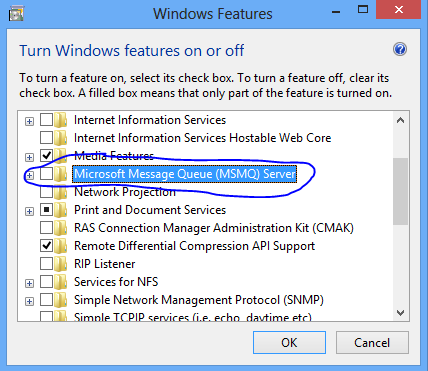
Figure 1. Adding MSMQ COM components
And after that I could find a file called C:\Windows\System32\mqoa30.tlb and added that reference.
Well tonight while I was deleting some spam comments from my blog and watching Dr. Who with my wife, I found a rather interesting comment.
So the story was:
First there is a VB6 DLL that had a class called Class1 with code like the following:
public type emprecord
name as string
end type

Public Sub Fn(T()as emprecord)
 MsgBox "The silence is comming said Prisoner 0"
End Sub
When this little dll was called from a VB.NET big brother
Dim test as new prj.class1
Dim em(0) as prj.emprecord 'able to create it no problem
em(0).name="hello"
test.fn(em)  ' here gives error
An error ocurred... well this is not very document issue with the TLBIMP tool which creates the interop assemblies. See StackOverflow Answer. The workaround is to right click on your type library, select properties, and change Embed interop Types to false.
After that you will be able to call your function.
I searched all over for a simple solution to pretty print xml with JavaScript. I saw several answers in StackOverflow, but I just wanted a straight answer that I could just paste on my page and voila! but no. I couldn't find one.
Some people suggested using Google Prettify and is fine but prettify does not handle indentation and I had to escape the < > characters in my xml, and I just wanted to embed the xml in the page and have javascript handle the rest.
For the indentation some people recommended another javascript called vkBeautify but I just wanted a quick snipped of how to do it, well in the end my friend Joseph and I just put together a quick sample.
It was very simple but I tought there should be a lot of people with something like that already done.
We embed our xml like this:
<script type="text/xml" id="xml2">
<data><test>10</test><test>20</test></data>
</script>
Indentation is handled with the vkBeautity.
var text = textToHtml(vkbeautify.xml(document.getElementById('xml2').innerHTML));
Then we needed a function to do the escaping for us:
var pr_amp = /&/g;
var pr_lt = /</g;
var pr_gt = />/g;
var pr_quot = /\"/g;
/** escapest html special characters to html. */
function textToHtml(str) {
return str.replace(pr_amp, '&')
.replace(pr_lt, '<')
.replace(pr_gt, '>');
};
And the rest is just using the google prettify:
<body onload="updateText(),prettyPrint()" bgcolor="white">
<pre class="prettyprint" id="xml">
</pre>
</body>
NOTE: this solution still has a problem with carriage returns. So indentation is yet to be fixed
UPDATE: I have fixed the issue. For some reason the IE gets rid of the '\n' in the string. So your have to change them for a <BR>
function updateText() {
	   		var text = textToHtml(vkbeautify.xml(document.getElementById('xml2').innerHTML));
			var expr = new RegExp("\n","g")
	   		document.getElementById('xml').innerHTML=text.replace(expr,'<br>');
		}
UPDATE2:
For IE you might need to add this after the doctype:
<!doctype html>
 <meta http-equiv="X-UA-Compatible" content="IE=Edge">
prettyxml.zip (26.35 kb)
prettyxml2.zip (27.49 kb)